Google’s Find Hub
- 4.2
- Rating
- 1.00B
- Installs
- Free
- Price

 Analysis by App-foxy
I started using Google’s Find Hub after realizing that “I’ll remember where I put it” is not a reliable storage system. A phone left under a cushion, a bag misplaced at a café, or a set of keys that has quietly migrated to another room can turn a normal morning into a frustrating search. This free tools app is designed for that exact moment: I open it when an item, device, or person I care about is no longer where expected, then work through the available location and sharing options until I have a practical next step.
What makes it more useful than a simple “ring my phone” shortcut is the way it brings several kinds of finding into one place. I can use it to locate devices, look for other compatible items, and share location with friends or family. That gives it a broader role than a single-purpose tracker, although the experience still depends heavily on the device, item, account, and connection involved. My overall impression is that it is most valuable as a prepared safety net, not as a magical answer after something has already disappeared.
From a missing item to a clear next step
The app comes from Google LLC and sits in the tools category, which feels appropriate because its value is practical rather than entertaining. It is free, carries an Everyone age rating, and has been available since December 11, 2013. With more than a billion installs and an average rating of 4.2 from around 1.6 million ratings, it is clearly familiar to a large Android audience. Those figures do not replace personal testing, but they do reflect how naturally this kind of utility fits into everyday phone use.
In-Depth Coverage of Google’s Find Hub
My preferred way to use it is to think in terms of a small workflow. First, I identify what is missing and avoid searching randomly. Is it my phone, another device, a tagged item, or a person who has chosen to share a location with me? That distinction matters because each situation calls for a different action. A phone that is probably nearby invites an immediate sound or visual search, while an item left somewhere outside the home requires a more careful look at its last known position and the surrounding circumstances.
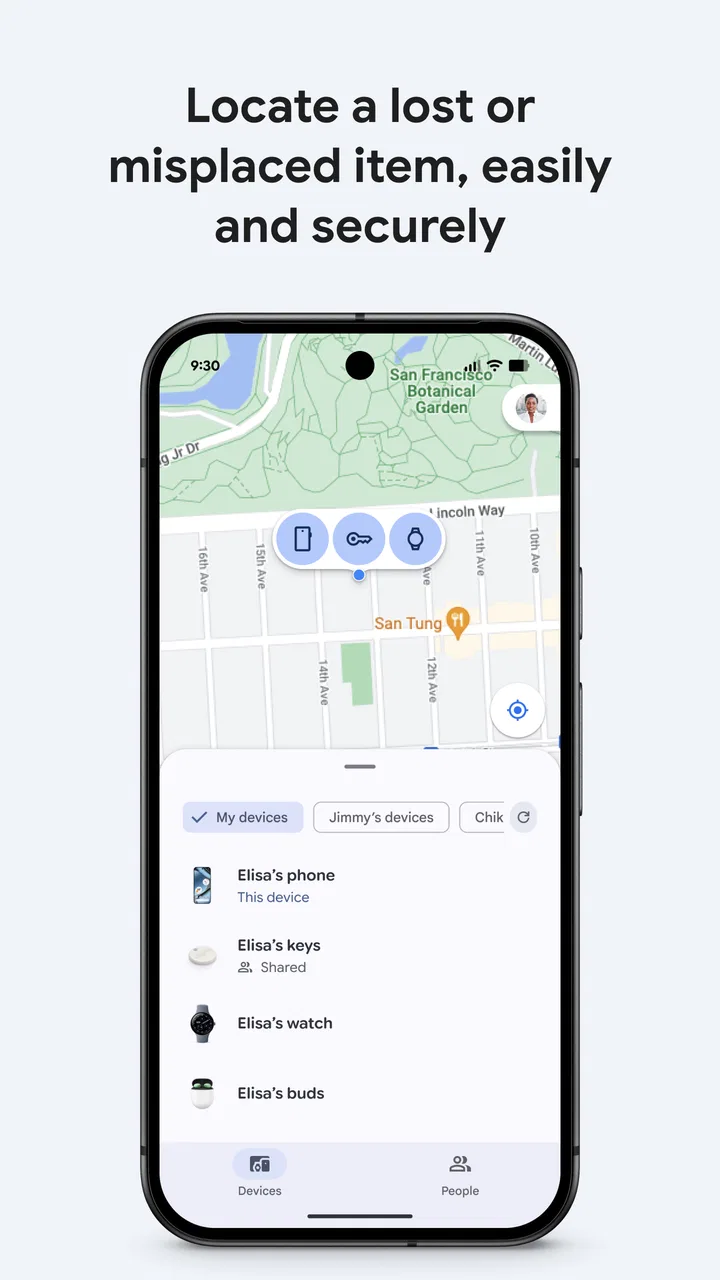
Opening the app gives me a central place to begin rather than making me jump between unrelated settings. I can inspect the available devices and items, select the one I am trying to find, and then follow the information shown on screen. The important habit is to treat the location as guidance, not as a guarantee that the object is sitting exactly at the displayed point. A map can narrow the search area, but it cannot tell me whether the item is inside a drawer, beneath a seat, or in the hands of someone who picked it up.
For a nearby phone, the fastest workflow is usually the simplest one: select it, use the available finding action, and search the likely places at the same time. I have found that this works best when I combine the app with memory rather than waiting passively for a perfect result. I retrace the last few minutes, check the entrance, sofa, desk, charging area, and pockets, and use the app to decide which room deserves attention first. The app reduces the search area; it does not remove the need to look.
There is a useful psychological advantage here. Without a central tool, I tend to repeat the same search in the same places because I am annoyed and rushing. A location view gives me a reference point and makes the process more deliberate. If the item appears to be close, I search slowly and listen. If it appears elsewhere, I stop turning the house upside down and consider whether I left it in a car, at work, or with another person.
A realistic morning scenario
Imagine I am leaving for work and cannot find my phone. I remember using it in the kitchen, then carrying groceries through the living room. Instead of checking every surface, I open Find Hub on another available device and select the missing phone. If the result suggests it is still close, I focus on the route between those rooms. I check the counter, the shopping bags, the floor beside the sofa, and the place where I normally charge it. If a sound or other locating action is available, I use that while keeping the room quiet.
The outcome is not merely “the phone was found.” The better outcome is that I learned which part of my memory was wrong. Perhaps I left it near the front door rather than in the kitchen. That small correction matters because it makes the app useful even when the map is not perfectly precise. It helps me turn a vague problem into a sequence: identify, select, narrow, inspect, and confirm.
There is another everyday case where the workflow changes. Suppose I lend an item to a family member and later cannot remember where it is. I do not want to search my home at all; I want to check whether the item is represented in the app and whether its current or recent information points to the person or place involved. That is where the handoff becomes important. Finding technology is only helpful when the person who has the item understands what is being checked and is willing to cooperate with the next step.
How location sharing fits into the workflow
Location sharing is a separate kind of task from finding a misplaced device. When a friend or family member shares a location with me, the app can help me understand where they are without requiring a string of confusing messages. I find this especially useful for meeting up, checking whether someone has reached an agreed area, or coordinating a pickup. The benefit is less about surveillance and more about reducing unnecessary back-and-forth when everyone has already agreed to share.
You May Also Like

 Hill Climb Racing
Why Hill Climb Racing Still Turns Crashes Into One More Run
A tiny car, a bumpy hill and one more upgrade: Hill Climb Racing keeps resurfacing because its simple chaos makes every near-miss feel personal.

 AliExpress - Shopping App
AliExpress Makes Global Shopping Feel Personal, but Shoppers Bear the Risk
AliExpress turns a global marketplace into a pocket-sized discovery engine. Its reach is useful, its shopping loop compelling, and its trade-offs easy to miss.

 Lords Mobile: Kingdom Wars
Lords Mobile Is a Kingdom-Building Routine, Not a Quick Match
A case-by-case verdict on the building, battles, device demands, and social commitments that make Lords Mobile rewarding for some players and exhausting for others.

 PDF Scanner app - TapScanner
TapScanner Makes Paperwork Easier to Capture, Check, and Share
TapScanner makes scanning with a phone feel less like a rescue operation and more like a dependable step in getting work done. Its capture tools are useful, though not flawless.

 Block Blast!
Block Blast! Shows How Much a Puzzle Game Can Leave Out
A quiet grid game shows why puzzle players increasingly value instant clarity, repeatable skill and low-pressure play—and where the genre still needs to catch up.

 Family Space
Family Space Review: A Shared Routine That Makes Family Life Easier
A parenting app earns its place not by adding more noise, but by making everyday coordination easier. Family Space gets that balance mostly right.
More From Our News Desk
View All News


The handoff needs care. I would not treat a shared location as permission to make assumptions about a person’s plans, and I would not use it as a substitute for a call when timing or safety matters. A location can lag, be imprecise, or reflect the last useful signal rather than the person’s exact current position. In my experience, the best practice is to agree beforehand on why the sharing is needed and when it should no longer be used.
This is one area where the app’s broad scope is both a strength and a responsibility. Bringing devices, items, and people into one finding experience is convenient, but those situations are not interchangeable. A missing phone is a personal recovery problem. A misplaced item may involve another household member. A shared location involves consent and expectations. I get better results when I keep those boundaries clear instead of assuming the same workflow applies to everything.
What happens when the first result is not enough
One of the less obvious lessons from using this kind of app is that the first screen should not be the end of the investigation. If the displayed position is familiar, I compare it with the last place I physically remember using the item. If the two do not match, I ask which memory is more reliable. A map can show where the device or item was detected, while my memory may only describe where I intended to leave it.
I also use a simple “last known context” routine. I write down the last confirmed moment I had the item, the route taken afterward, and anyone who may have handled the bag, phone, or keys. Then I check the app again and decide whether the result supports that route. This prevents a common mistake: treating a location marker as proof that an item has never moved. It is better understood as one piece of evidence in a short investigation.
Another practical tip is to prepare before anything goes missing. I make sure I know which devices and items are visible in the app and that I understand the basic finding controls while everything is safe at home. Learning during a panic is slower, especially when I am borrowing someone else’s phone or trying to leave for an appointment. A few minutes of preparation can turn an unfamiliar interface into a familiar emergency tool.
I also recommend checking the physical reality behind a digital result. If an item is shown at home, I search containers and unusual surfaces rather than only open spaces. People often put a phone on top of a cupboard, inside a coat, or beside groceries without consciously recording the action. If the result points to a public place, I think about whether returning there is sensible and whether I should contact the venue or another person instead of attempting to recover the item alone.
Where it compares well with ordinary alternatives
The usual alternative is a manual search followed by phone calls or messages. That approach is fine when I know the item is nearby, but it becomes inefficient when memory is uncertain. Find Hub gives me a structured starting point and can connect the finding process with location sharing, so I do not have to build the entire workflow from scattered conversations.
Another alternative is using separate manufacturer-specific tools for separate devices. Those can be preferable when someone lives entirely inside one brand’s ecosystem or needs controls that are unique to that hardware. Find Hub is more appealing when I want one familiar Google-centered place for the devices and compatible items that matter to me. The trade-off is that a unified app cannot make every product behave identically. The available action and the quality of the result can vary with what I am trying to locate.
For people who only lose their phone inside the house, a voice assistant or a quick call may be faster. I would not open a full finding app for every tiny incident if I already know the phone is under a blanket. Find Hub earns its place when the location is uncertain, when another item is involved, or when I need a more organized view of the situation. It is a backup plan that becomes more valuable as the search becomes less obvious.
Dedicated item trackers can also be a better choice for someone whose main concern is a particular bag, bicycle, wallet, or set of keys and who wants a device designed around that object. Find Hub makes more sense for users who value a broader finding workflow and already use compatible Google-connected devices or items. I would choose based on the object I need to protect, not simply on the fact that the app is free.
Where the workflow breaks down
The biggest limitation is that the app cannot create information that the missing device or item is unable to provide. If the device is unavailable, disconnected, out of reach, or otherwise unable to contribute a useful signal, the result may not solve the problem immediately. That is not a flaw unique to this app, but it is important emotionally: opening a map does not guarantee a live, exact answer.
Accuracy is another source of friction. A displayed area may be enough to tell me which building, street, or room deserves attention, but it may not identify the exact shelf. Indoors, several rooms can feel equally plausible. In a busy public place, many people and objects can pass through the same area. I use the app to prioritize actions, then confirm the result with physical inspection or a conversation.
There is also a human handoff problem. If a family member needs to help locate an item, they may not know which device to select or what the displayed information means. If a friend shares a location, both of us need to understand the arrangement. The app can organize the information, but it cannot resolve unclear communication. I have learned to state the next action plainly: check the car, call the café, wait at the agreed entrance, or stop searching because the item has been found.
Privacy and attention deserve a practical mention as well. Location sharing should be intentional, limited to people I trust, and stopped when the reason for it ends. I also avoid repeatedly refreshing the app without changing anything in the real world. If the result has not changed, another refresh is unlikely to help as much as checking the last route, asking a witness, or looking in a less obvious place.
People who dislike account-based tools, rarely carry compatible devices, or expect pinpoint recovery in every situation may be disappointed. The app is not the right answer for someone who wants a completely offline method or a guaranteed way to recover an item that has been moved and cannot report useful information. In those cases, a physical routine, a labeled storage spot, a direct call, or a dedicated tracker may be the better solution.
Who I would recommend it to
I would recommend Find Hub to Android users who want a dependable first stop when a phone, device, or compatible item goes missing. It is especially helpful for households where people coordinate regularly, because location sharing can reduce needless messages when everyone has agreed to use it. It is also worthwhile for anyone who has experienced the familiar frustration of knowing an item is “somewhere nearby” but not knowing where to begin.
I would be more cautious about recommending it as the only protection for expensive equipment or important belongings. The sensible approach is layered: use the app, keep a consistent storage habit, label items where appropriate, and know whom to contact if something is lost in a public place. Digital finding works best when it supports good habits instead of replacing them.
After using it through the full process—from realizing something is missing, to checking the available information, to handing the next action to another person—I see its main strength clearly. It turns a vague search into a sequence of decisions. That is more valuable than a flashy interface because it helps me stay calm and choose a sensible response.
Google’s Find Hub is not perfect, and I would not promise an exact answer every time. Still, as a free tools app from Google LLC, it offers a useful central workflow for finding devices and items and coordinating shared locations. I would install it before I need it, learn the basic controls while everything is accounted for, and treat its results as guidance that leads to real-world action. For everyday Android users, that makes it a practical safety net rather than just another app sitting unused on the phone.
FAQs for Google’s Find Hub
01What is Google’s Find Hub and how does it work?
Google’s Find Hub is a centralized app designed to help users locate their lost or misplaced devices easily. By integrating with your Google account, it allows you to track devices like phones, tablets, and smartwatches. The app provides real-time location updates and can remotely lock or erase data on your devices to protect your information.
02Is Google’s Find Hub free to use?
Yes, Google’s Find Hub is completely free to use. As long as you have a Google account, you can access its features without any charges. The app's primary goal is to ensure users can quickly and effectively locate their devices, providing peace of mind without any additional costs.
03What devices are compatible with Google’s Find Hub?
Google’s Find Hub is compatible with a wide range of Android devices, including smartphones, tablets, and smartwatches. To use the app, your device must be linked to your Google account. While primarily designed for Android, some features may be accessible through web browsers on non-Android devices.
04How accurate is the location tracking in Google’s Find Hub?
The accuracy of Google’s Find Hub location tracking depends on several factors, including your device's GPS signal, Wi-Fi connection, and proximity to cell towers. Generally, the app provides precise location details, but in areas with poor connectivity, the accuracy might be reduced. It's advisable to ensure location services are always enabled for best results.
05Can I use Google’s Find Hub to locate someone else’s device?
No, Google’s Find Hub is designed for locating your own devices that are linked to your Google account. Privacy and security are paramount, so the app does not allow tracking of devices that belong to other users. Each user must log in to their own Google account to use the app's features.
Pros
- Easy integration with smart devices.
- User-friendly interface for quick access.
- Real-time updates on device locations.
- Customizable notifications for alerts.
- Secure login with two-factor authentication.
Cons
- Limited functionality without internet.
- Drains battery with continuous use.
- Requires permissions for most features.
- Occasional glitches in location tracking.
- Some features locked behind a paywall.

Google’s Find Hub
Gallery